
Overview
There are times when you will want to review which of your Jamf Pro environments AppsAnywhere is linked to. Luckily, doing so is really simple. In this article we'll take a look at how you can see which environments AppsAnywhere is currently linked to
Viewing the environments
Navigate to the Manage Jamf Pro Environments page:
-
Log into AppsAnywhere as an admin user
-
Click on Return to Admin to access the AppsAnywhere admin portal
-
On the sidebar menu, go to Connectors > Jamf Pro Server
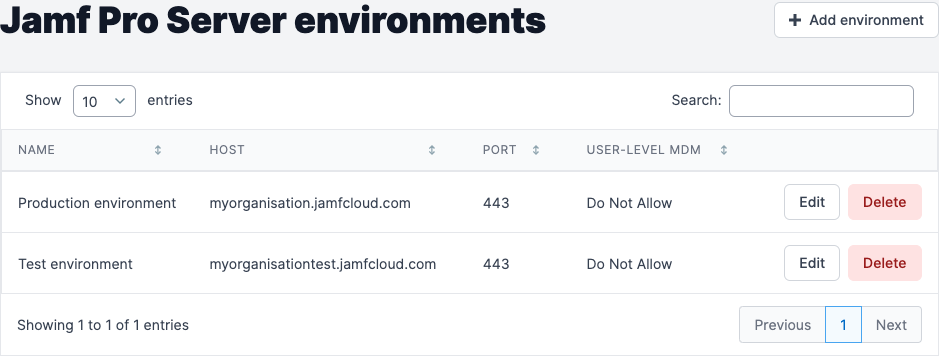
Here you will see a full list of the Jamf Pro environments AppsAnywhere is linked to.
If you have a large number of environments, you can use the live search to quickly find the entry you are looking for.
From this page you can:
-
Click the Edit button next to an environment to modify the details of that environment - See Editing a Jamf Pro Environment
-
Click the Delete button next to an environment to delete that environment - See Deleting a Jamf Pro Environment
-
Click the + Add environment button in the top right to create a new environment - See Adding a Jamf Pro Environment
Editing the details of, or deleting, a Jamf Pro environment will affect users' ability to launch any resources provided from that environment. Be sure to test everything is working as you expect after you make any changes!