
This feature requires the App Library to be enabled.
Overview
Applications that are set up to use an AppsAnywhere Cloud Delivery delivery method, will be set up with an AppsAnywhere Library delivery method that will have a certain application assigned to it that has been packaged by AppsAnywhere.
This new admin page lists all AppsAnywhere Library apps with available updates for Cloud Delivery. As an admin user, you will receive dashboard notifications when new versions are available, ensuring that users benefit from the latest software versions, offer a great user experience, and stay secure with no out-dated software vulnerabilities.
Viewing Cloud Delivery updates
-
Log into AppsAnywhere as a System Admin user
-
Click on Admin in the user menu to access the AppsAnywhere admin portal
-
On the navigation menu on the left of the page, go to Cloud Delivery → Updates
This will show a list of application that have an AppsAnywhere Cloud Delivery delivery method with an application packaged by AppsAnywhere with their status and information about the current and available packages. You can use the search box in the top left of the table to quickly search for a package update.
From this page you can:
-
Click the View app button which will take you to the delivery method on that application to be able to update the package version.
Columns
A description of each column in the table containing the list of updates is given below
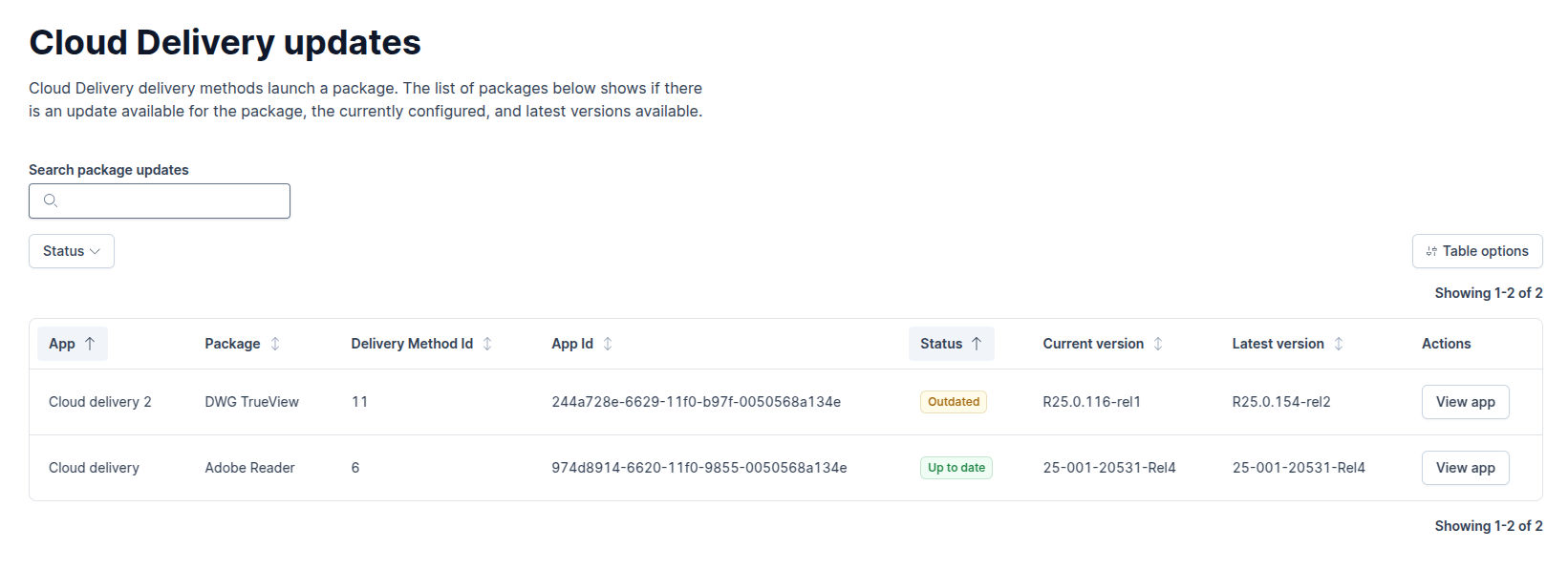
|
Name |
Description |
Default state |
|---|---|---|
|
App |
The name of the application that the package is assigned to |
Visble |
|
Package |
The name of the package that will be launched by the Cloud Delivery delivery method |
Visible |
|
Delivery Method Id |
The Id of the delivery method that will be launching the package (useful for support if there is a problem) |
Hidden |
|
App Id |
The Id of the application the delivery method is part of (useful for support if there is a problem) |
Hidden |
|
Status |
The status of the package, whether it is using the latest version or and older version of the package |
Visible |
|
Current Version |
The current version that this package is using on the delivery method |
Visible |
|
Latest Version |
The latest version that this package has available to use |
Visible |